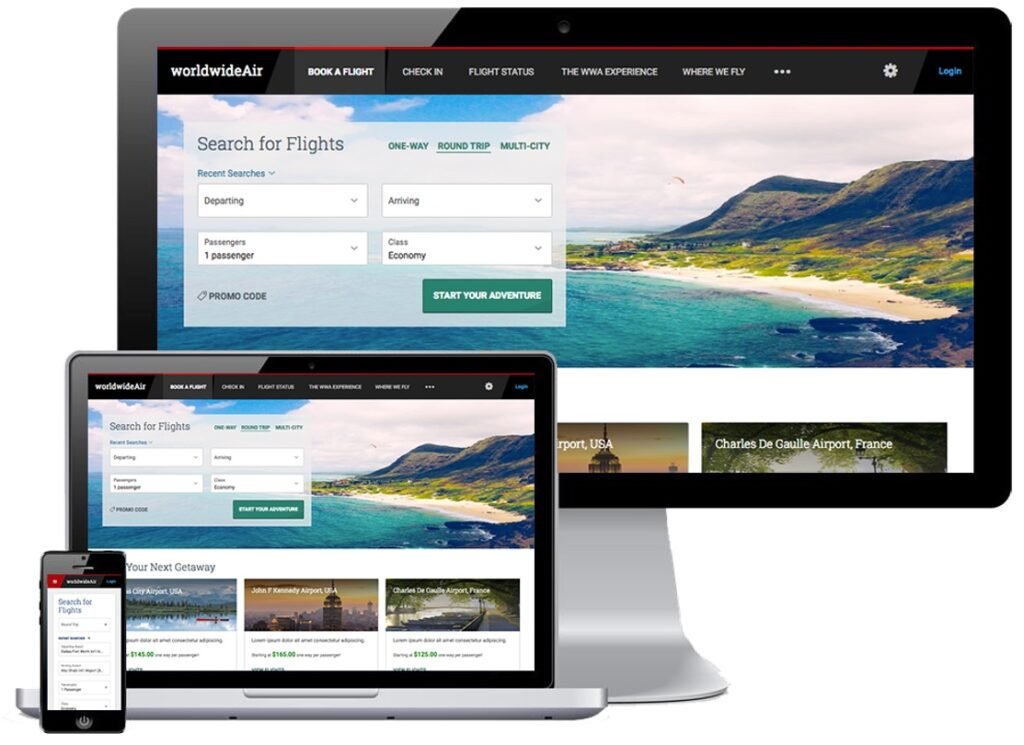
Digital Experience – E-Commerce Solution
SABRE’s White label Solution to Shop and Book Airline Tickets
and Web & Kiosk Check-In
Digital Experience re-design project strives to combine the previously separate desktop and mobile products into a unified responsively designed website that will have:
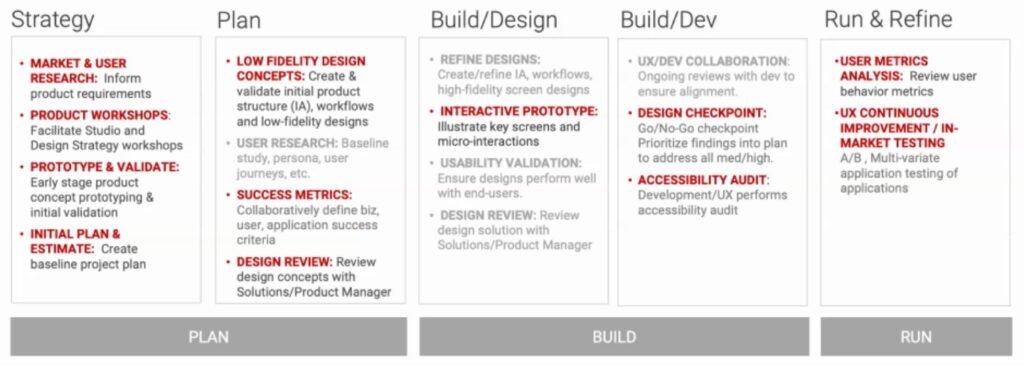
Design Process followed in Project
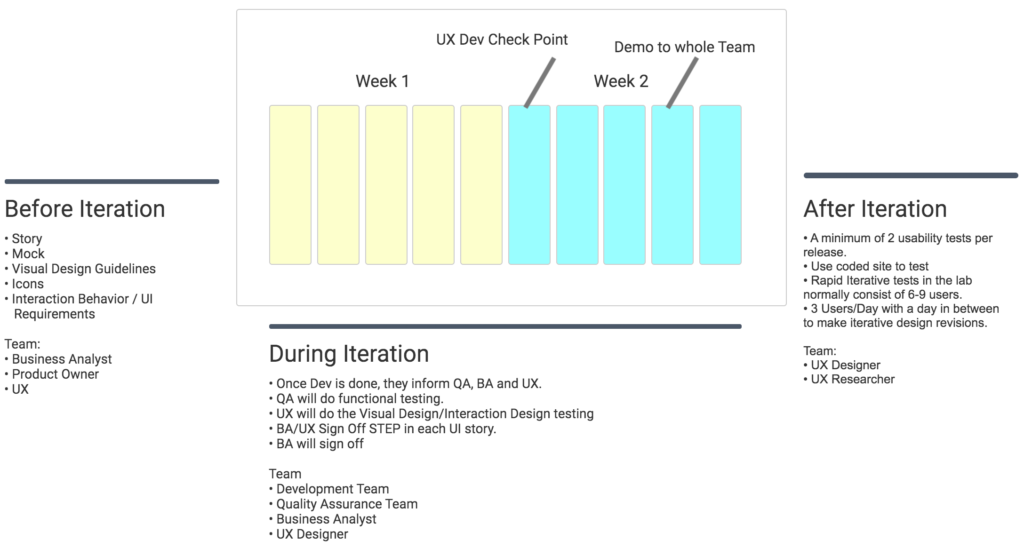
Scrum Framework Process
Overall Strategy and Design Breakthrough
In the 3 legged stool of Desirable, Viable, and Feasible, my job was to determine what was Desirable by end users.
At a high level, this was done by Think > Make > Check, Repeat. Design Thinking techniques such as empathizing with end users, the ideation of potential solutions, and testing for validity and effectiveness were incorporated.
Interviews gave the team insight that selling more trip options or “ancillaries” such as checked bags, meals, lounge access, and others would be more likely after the flights were booked when the travelers were at the airport rather than during the booking process. This is because users disconnect the prices of the flight and the ancillaries if they are at different times. If a user books a flight with an ancillary they see their total rise and are less likely to add it at that time. Once they are at the airport and they have a hungry child crying or a delayed flight, they are more likely to be willing to purchase a meal or lounge access. This led to smartphone push notifications and smartwatch designs that weren’t overlay pushy during the flight booking flow when users were trying to book a simply and quickly as they could and instead offered helpful, timely, and personalized offers at the airport. Overall SUS System Usability Score jumped from 87% to 94%, a 9% improvement.
MY ROLE
I was part of the Design team and responsible for the experience strategy and design of the “Book and Shop“, “Manage Your Booking” and Check-in Solution for desktop, tablet and mobile. I lead the UX work producing all major deliverables and presenting them to Business and technology and also to some external clients like Etihad, American Airlines etc.
I work along side 3 other Designers who worked on various part of the application.
I wrote down the prototype script which every designer followed and worked on to bring consistency of the application along with several other design deliverables.
I also created an application called Rules Engine for Airlines Passenger Reaccomodation process – a white label solution for American Airlines and for other airlines which helps in Passenger Reseating process.
I also created a website for Airline Developer so that they can use SABRE’s API’s and build and customize “Digital Experience” application for their airline. This website give a complete “Developer Experience” to the Developers and product Managers who visit the site.
Business Goals:
- Responsive Design Customization Framework
DX offers each airline the ability to customize the User Experience with its Customization Framework. - Time to Market
Digital Experience provides the airline with ability to change their site on their own timeline. - Flexibility to Differentiate
Every airline wants to present their product and services as they see fit. Digital Experience enables them to do that. - Modern Architecture
A new modern tech stack enabling a great user experience with the ability to scale with their growth.
Problem/Opportunity / Project Drivers:
What problem or opportunity are we trying to solve? What are the key drivers of the opportunity? What are the root causes the problem(s)? What are the goals of the project? What do we want to achieve?
- To raise the number of bookings
- Increased purchases of upgrades (including seats and extras either during or after booking)
- Improve Task success rates
- Improve customer satisfaction
- Improve time to complete bookings
Customer Insights:
Who are our customers (e.g. Buyers)? What do they think of us? Why should they care about this product or service? Do we already have a customer commitment?
- Our customers are airlines
- They think we have a valuable product, but that it lacks polish
- They care about this product because it is their online presence to generate revenue from their customers by booking flights and adding ancillaries
- Many airlines have purchased the product and converted from previous versions or competitors
UX Priorities for the project:
- To design a product that drives:
Increased business via new customers.
Higher conversion rates.
Increased upsells. - Push to have UX involved early in the planning stages.
Drive the direction of the product for innovation and accurate project plans.
Drive innovation by being front-to-back instead of back-to-front. - Have the support of the entire project team.
To allow the UX Designers to lead with innovative design ideas.
Business and User Metrics:
What does success look like for this project? What are the key metrics for the business; for the user?
- Number of bookings
- Total price of upgrades (including seats and extras either during or after booking)
- Task success rates
- Customer satisfaction
- Time to complete bookings
Key User Tasks and Context (Mobile):
What are we helping users accomplish with this solution? What’s critical to user success? Are there any existing pain points? What is the user context for this task? How frequently do they do this task?
- Being able to compare various offerings on limited screen real estate
- Limited time due to micro moments (i.e. quick browse while waiting for the dentist)
- Task frequency varies by user. Some are frequent fliers and some only go on occasional trips. Some travel domestically and some travel internationally. Some are high tech, others are older or disabled
- Mobile access is suspected to be higher in younger, more high-tech users at this point. The challenge is to design the mobile interface so all users can feel comfortable with it
- The site consistently scores 90+ SUS and 1.8+ out of 2 Task Success in usability testing. The product then successfully handles various sized airlines needs with customized features and layouts and enabled thousands of bookings and millions of dollars.
- Overall SUS System Usability Score jumped from 87% to 94%, a 9% improvement – when we put the focus on booking the ticket first by introducing features on flight results and removing unnecessary ancillaries from booking flow.
- Decrease in average flight booking time from 13 minutes to 9 minutes and 24 seconds by optimizing flight search results, ancillaries and seat map (adding an option to skip seats). A saving of 3.6 minutes or about 27.69% per booking.
- Our design process (described below) was used to launch multiple airline websites around the world in various language and currencies generating recurring revenue and contract renewals.
- Recurring meeting with Business and jointly writing requirements with Product Owner or Business Analysts. Business write functional requirements and UX writes Interaction requirements with Visual Design help.
- Have regular bi-weekly meetings with the “Design System” team to both show them our ideas for improvement and also ensure we are compliant.
- Routine internal design review and then routine project team presentations and regular demos. UX and Dev sync up before demo to avoid surprises.
- Started the “BA UX Sign Off” step where both UX and BA together sign on any story.
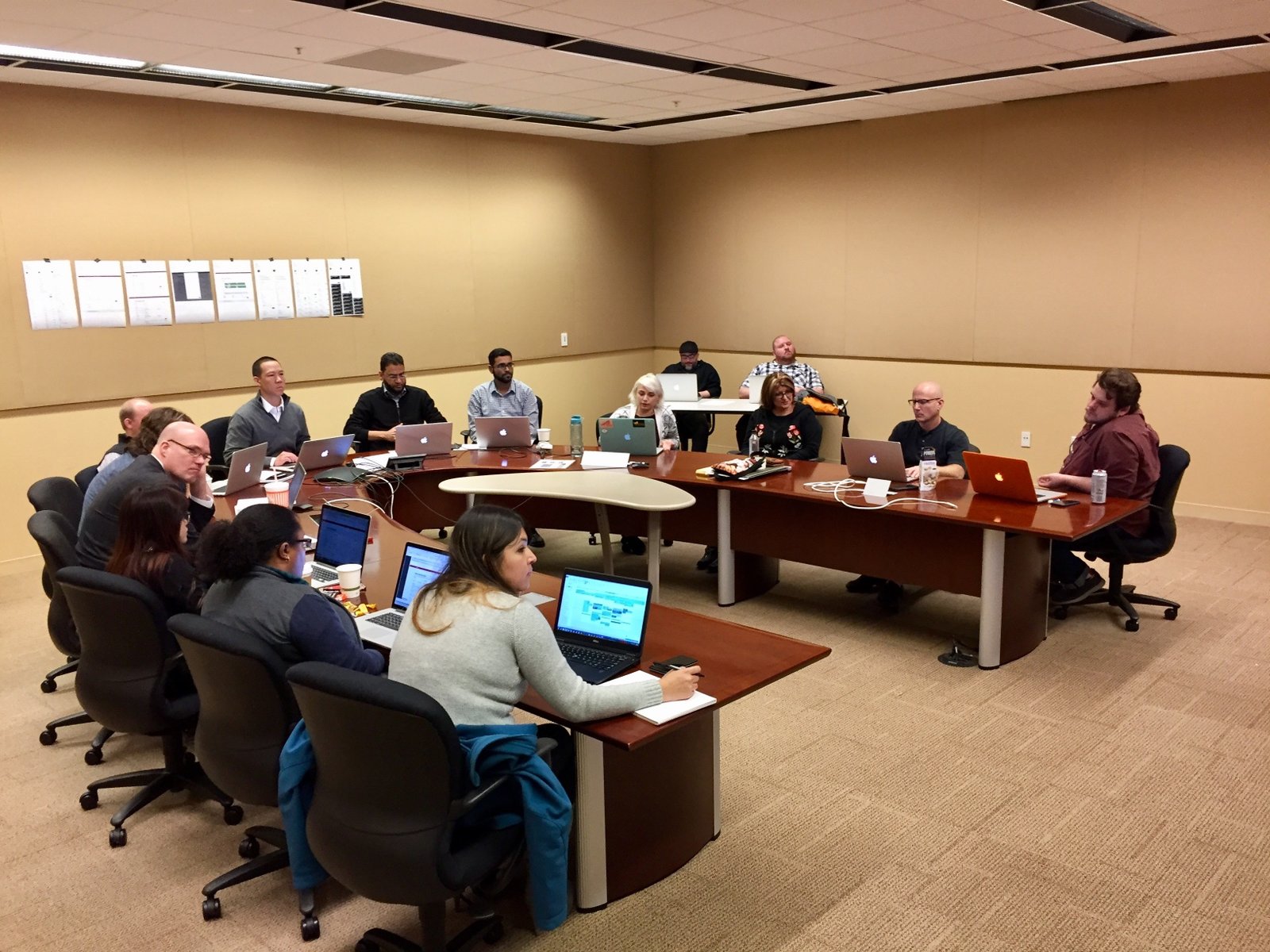
- In this phase, we first worked to agree with entire product team on what problem they were trying to solve.
- They used analytics, a customer request, a user pain point, and a product team member’s idea.
- I made sure that we had representation from each partner group including product management, project management, engineering, and QA.
- Common issues to avoid: “Many companies are reactive and rush to implement customer requests. These requests should be considered, but you also need to have a product vision of your own as well.“
2. Research
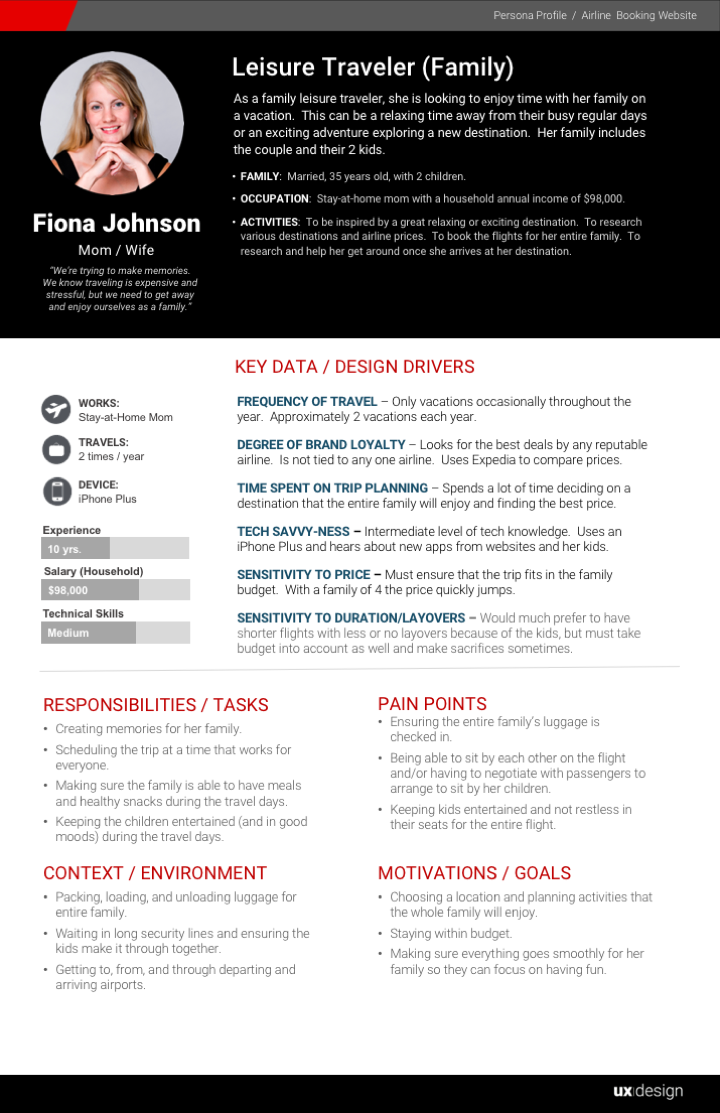
- User research was then performed to empathize with the actual end users to understand their goals, motivations, pain points, context, responsibilities, experience, and skills. This was captured in the form of personas, journey maps, empathy maps, and user flows.
- Market research was done to better understand key business drivers and industry trends.
- Competitive analysis was done as research into the competitors products’ strengths and weaknesses. This helped to uncover potential differentiators
- Research Tip “Take a step back and analyze design solutions outside of your industry as well. There may be a solution or clever idea out there that you can get inspiration from and tailor to your specific project.”
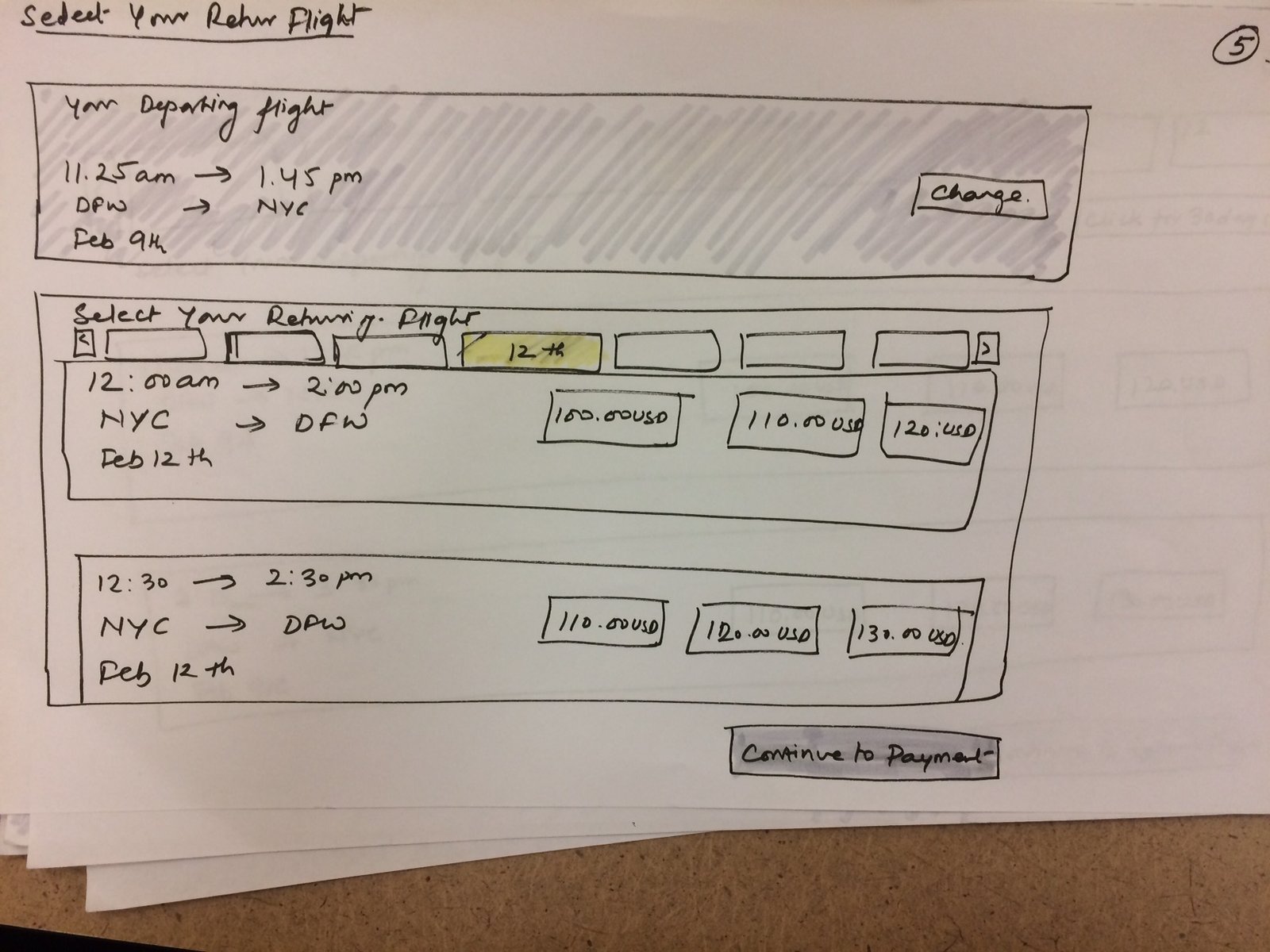
- This included brainstorming, creating an opportunities matrix, and whiteboard sketching.
- This is where the team thought about how they wanted to implement innovative ideas and emerging technology.
- Incorporated natural language, augmented reality, and virtual reality in their designs in ways that benefited both users as well as drove revenue for the business.
- Design Process tip – “Clearly communicate both the user and business benefits of your innovative ideas. Explain how they can make your entire product team heroes if you all can implement and launch them together. If it cannot all be implemented in a single sprint, plan it out step-by-step so that your users can take advantage of some parts of it and the ultimate functionality is added in release-by-release incrementally.“
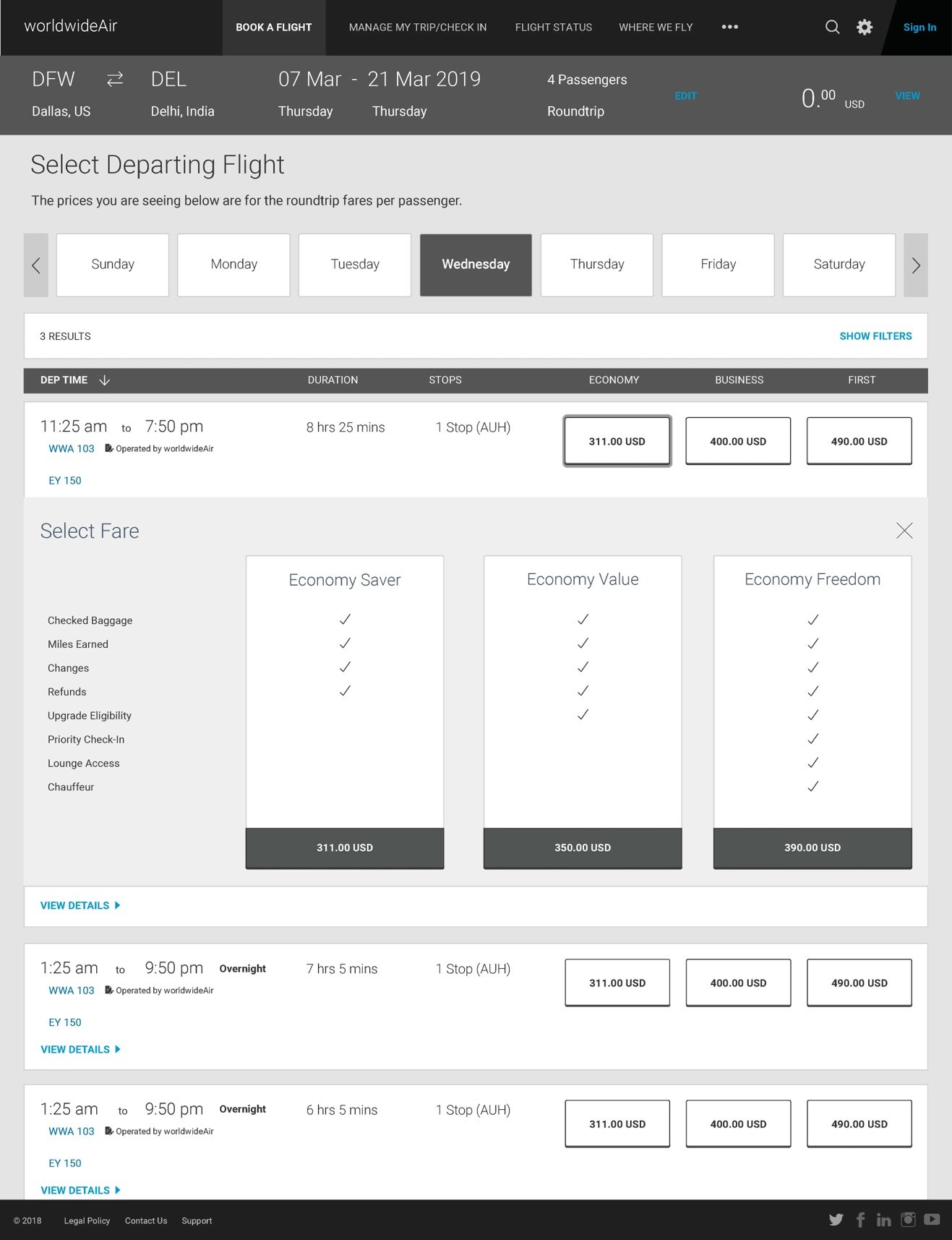
- This included wireframes communicating location and size of content on the screen, prototypes communicating interactivity, and visual designs communicating colors, fonts, iconography, and imagery.
- Branded fares are packages of flights with various amenities bundled together. Various designs and layouts were usability tested and the best performing proved to be where the packages were displayed side-by-side so the users could clearly see what added value each higher package gave them for the increase in price. (see images below)
- Accessibility was of utmost importance to the project driven by the Department of Transportation “DOT”. For example, the color contrast between the font or button and its background needed to be high enough to view easily and an online contrast checker like https://webaim.org/resources/contrastchecker/ was used to ensure it was WCAG AA and ADA compliant.
- Mobile first design was used to ensure the most important information is easily accessed and viewable on smaller width screens before designing it for wider width screens with more screen real estate.
- Design Tip: “Both accessibility and mobile designs are sometimes after thoughts, but needs to be built in from the beginning to avoid rework, extra time, and forcing things in last minute (which will be evident to your users). Identify the necessary content your users need to focus on and how to display it in the smaller screens that you know or want your users to be experiencing your designs on.“
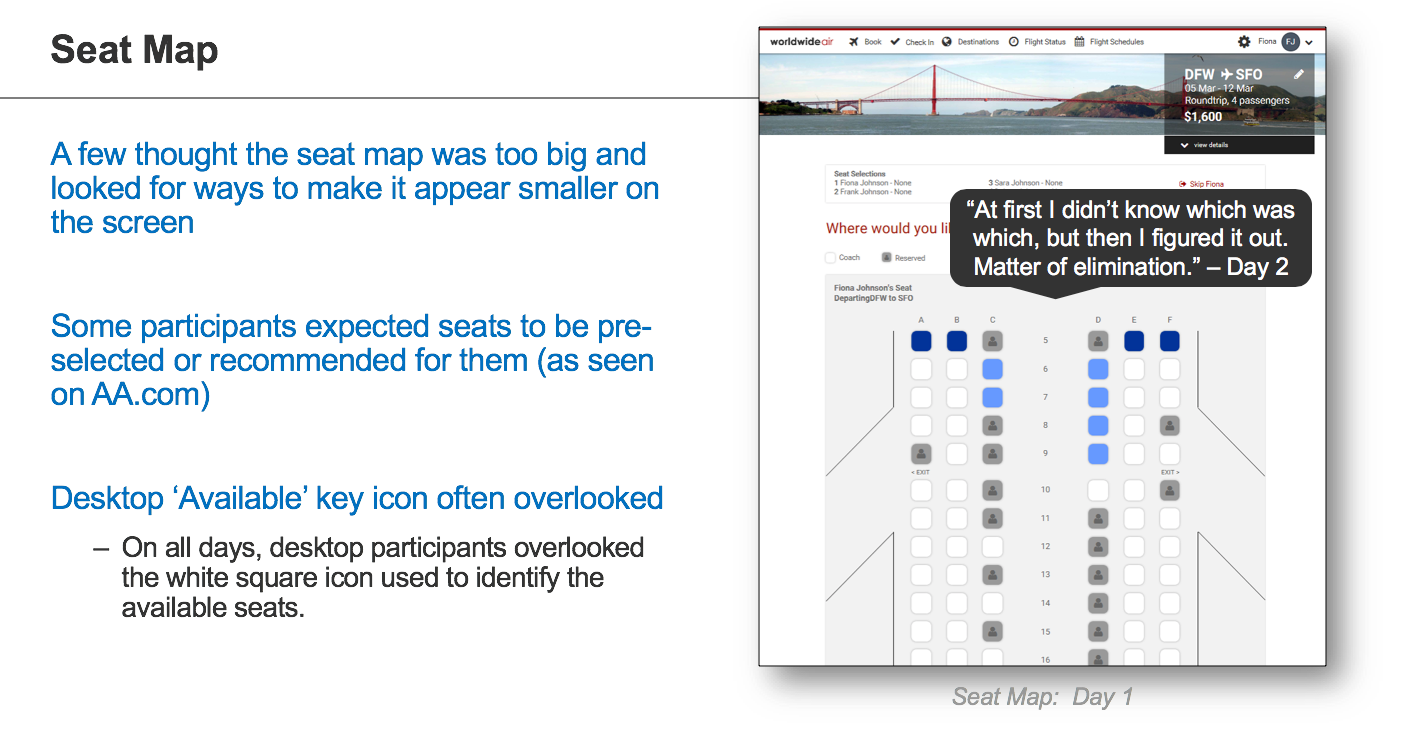
- A script was written that introduced end user test participants to the design, the role they were filling, and gave them context about the designs and tasks they were about to see and perform.
- When recruiting actual end users of the design, a point was made to ensure participants had varying levels of flying experience, desktop/tablet/mobile device experience, and wide ranging ages and languages.
- Design iterations were done by revising the prototype based on themes in user feedback and success and doing another round of usability tests to confirm the revisions.
- Design Breakthrough “Usability testing showed that seat selection was very polarizing. Travelers either were meticulous about choosing their seats down to the seat width, seat pitch, location, entertainment, power plug, exit row, etc. or they didn’t care and wanted to just book their flight as quickly as possible. One user even said “Don’t waste my time making me choose a seat, all of the passengers are getting to the same place.” This led to the addition of options for the user on the step before the Seat Map which is the Passengers page. On this page, a “Skip Seats” button was placed next to the existing “Continue to Seats” button to account for both types of users. This was one of the factors that led to a decrease in average flight booking time from 13 minutes to 9 minutes and 24 seconds. A saving of 3.6 minutes or about 27.69% per booking.”
- Common issues to avoid – “Having time to do user testing is a great step, but be sure to also make sure the project timeline has reserved time for thinking through and redesigning based on the user feedback and themes captured during the sessions.“
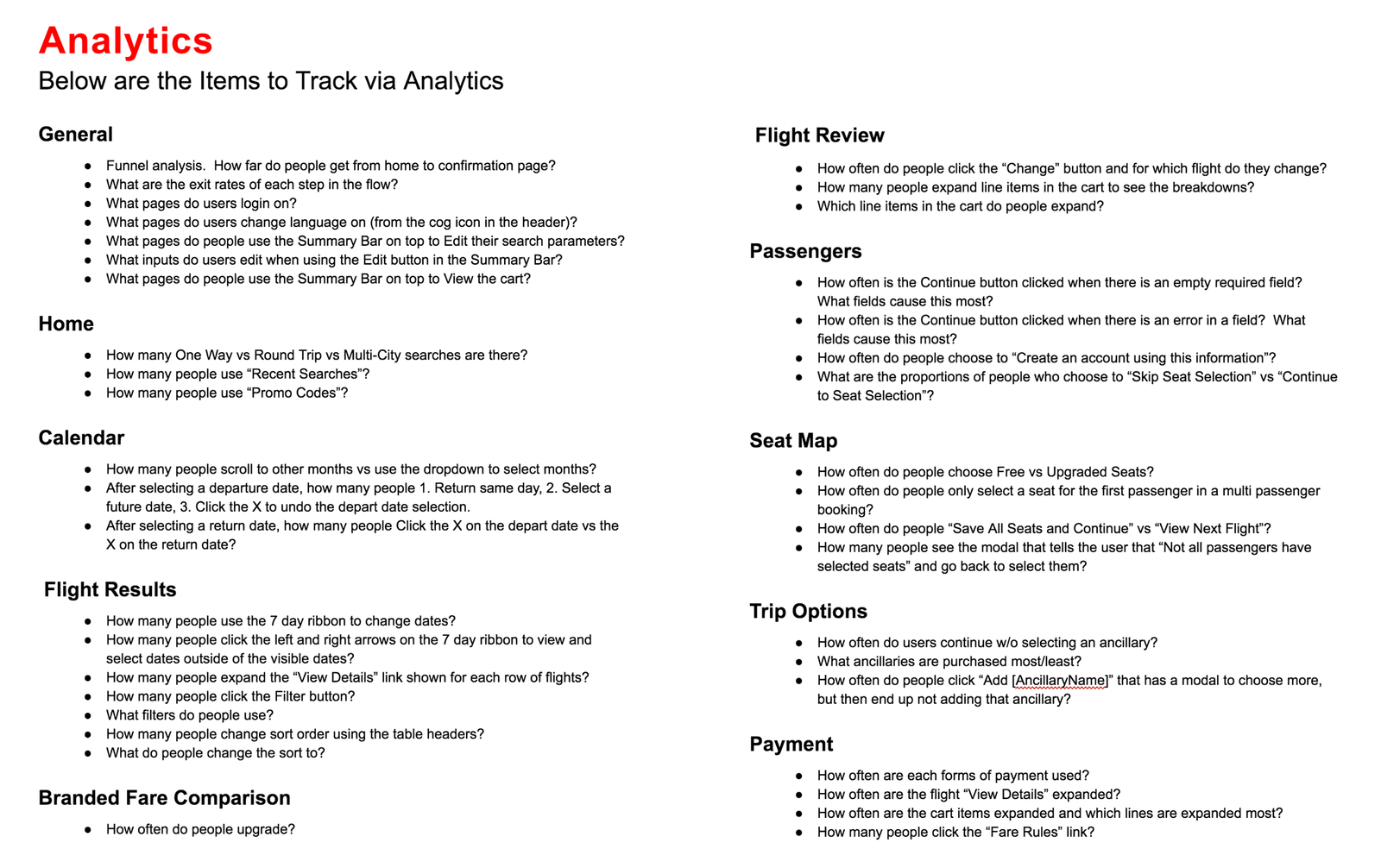
- Analytics were added to track the usage of the design. This gave hard data and statistics on performance including: what links were being used, how many conversions there were, what page users existed most, where users are spending more time, where users are dropping from the website, and more.
- Looping back to #1 Define using the data from this analytics step helped to define what needed to be improved next.
- Common Issue to Avoid “Tracking the correct interactions is just the first step. If you aren’t regularly analyzing and using the data to determine what needs to change and improve, then the analytics are not being utilized effectively.”
- Worked with analytics team to track various user interactions on each page of the airline booking flow.
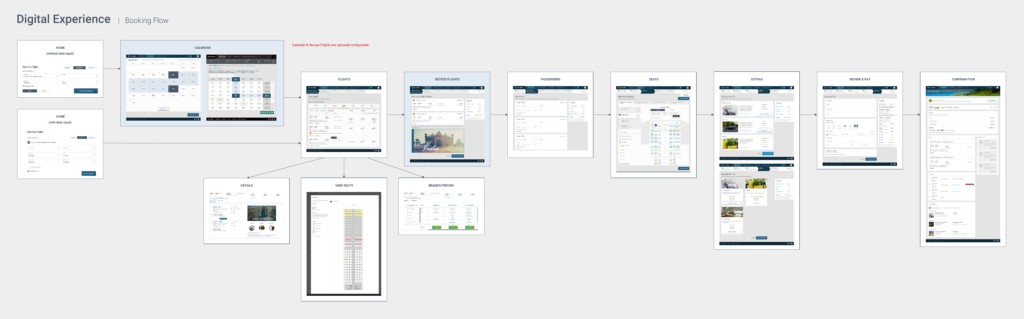
Workflows and Journey Map
Booking Flow, Post Booking Flow, Concepts, Requirements, Seat Reaccomodation Eco System and Seat Reaccomodation Workflow