xCP 2.0 – Application Builder and Deployment
Fully Integrated Development Environment to Build Case Management Applications
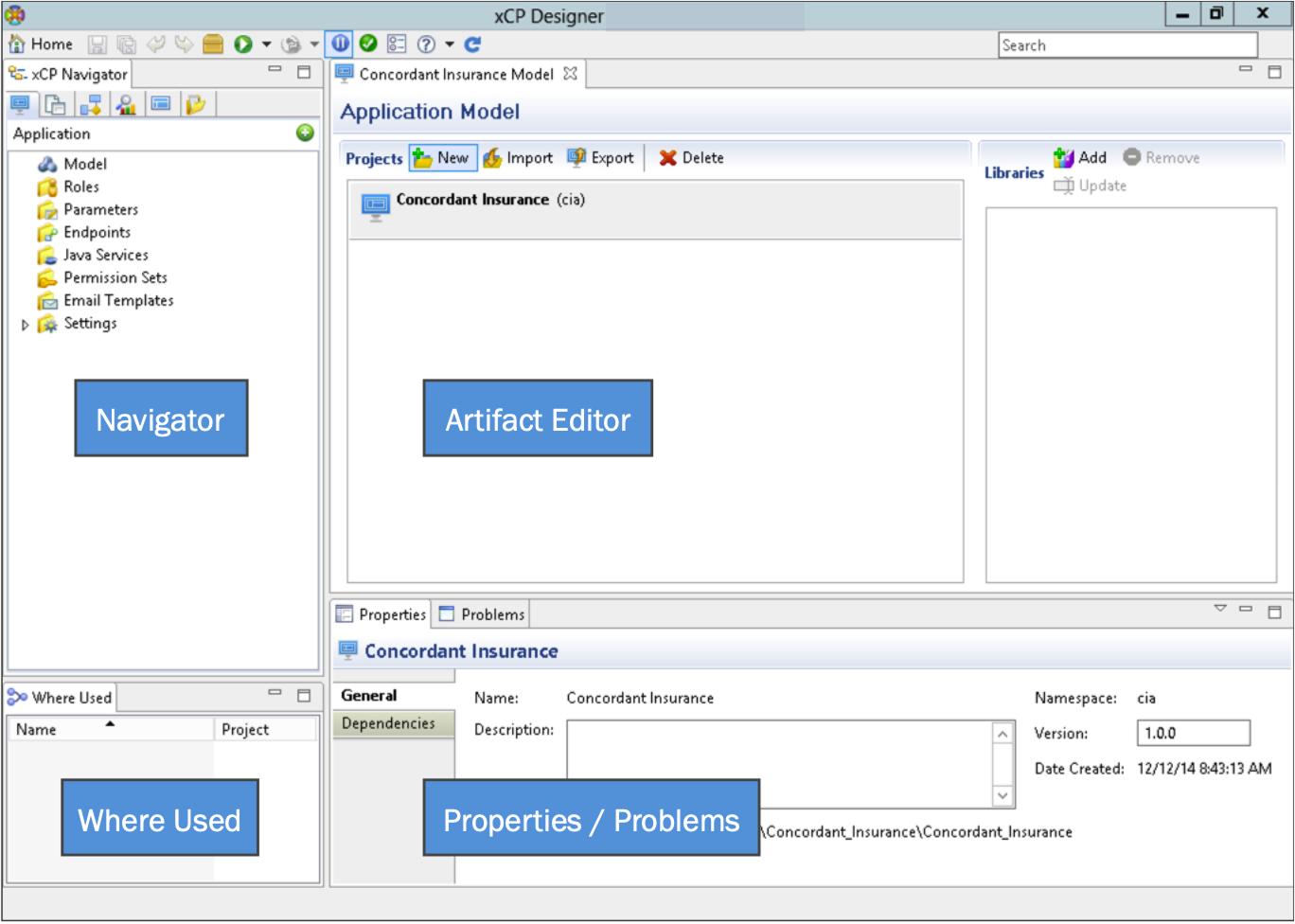
xCP accelerates case management application development by providing reusable components, model-based configuration, and easily configurable user interface and dashboard tools. xCP Designer is the new all-in-one configuration tool that can be used to create xCP applications and it combines Forms Builder, Process Builder, Taskspace, Composer and several other tools that were needed to create xCP 1 applications.
It enables Java Developers and IT architects to compose and maintain applications using graphical tools. It’s configuration not coding and makes bringing new web based applications to market faster, easier, and less expensive.
Year 2009 – 2014, San Francisco, CA
Senior User Experience Designer on xCP 2.0 | 2009 – 2012
- KEY CONTRIBUTIONS: Prototyping and UX Research, Visual Design leadership, Competitive Analysis, Platform Designer, Pattern Design, Information Architecture
- I joined EMC during the early conceptual stages of xCP 2.0 (xCelerated Composition Platform) and served as a guiding factor in the project’s vision through its full construction. My work supported the Information Intelligence Group (IIG) and the cross-functional UX and development teams in architecting a next-generation platform for cloud-based case management solutions.
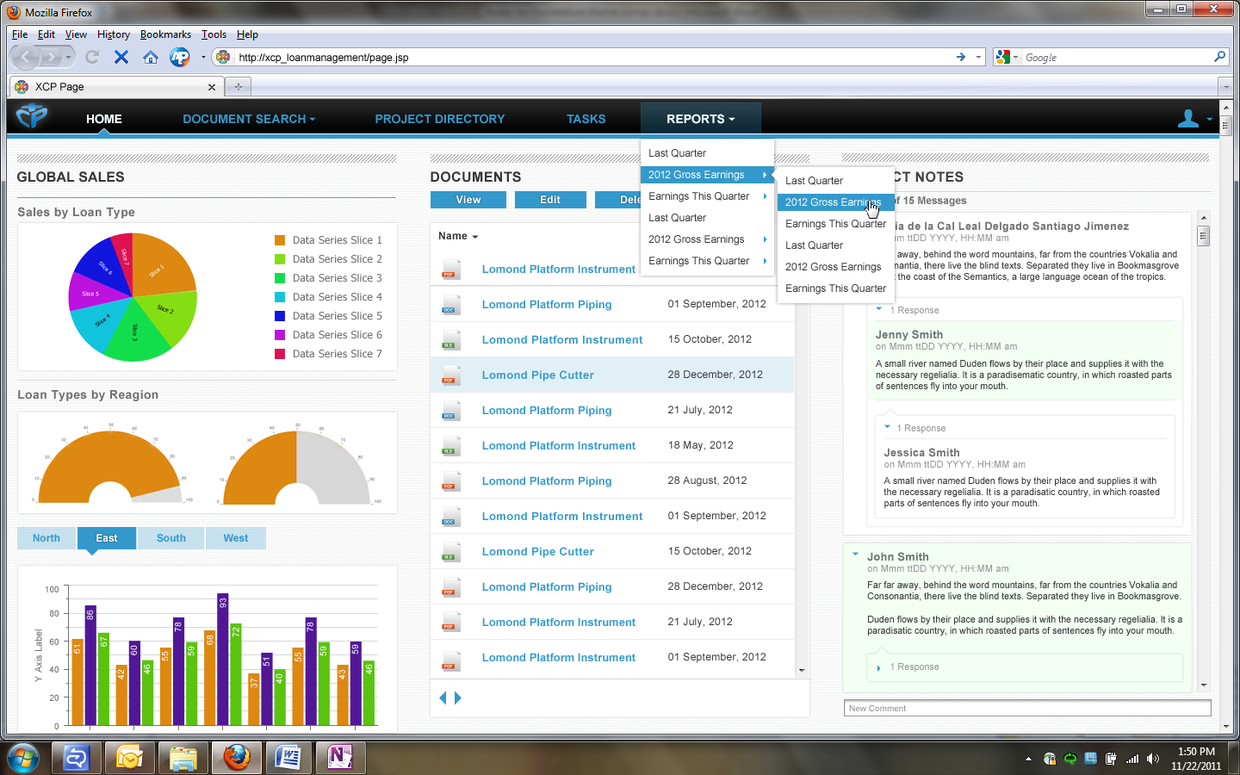
- My primary focus was the UI Composition framework for the xCP Designer—a unified, Eclipse-based application builder—as well as the design of the runtime end-user experience. I provided UX consultancy for several critical workstreams, including full-text search, business analytics (BAM), and content viewer technology
- My contributions to xCP include extensive interactive prototyping using Axure, Contextual inquiries and user research, development of personas, significant work on competitive analysis, and delivery of detailed user experience and information architecture specifications. I was also the Prototyper who used to combine and create the final Integrated prototype in Axure after collecting files from all Designers.
- I was a “Pattern Designer” on the project wherre I worked with UX Architect and designed several patterns like Drag and Drop and File Select which were used by a team of 9 Designers for xCP Application builder.
Principal UX Designer on EMC OnDemand | 2012 – 2014
- KEY CONTRIBUTIONS: Product Evolution, End-to-End Design, Validation
- I served as the sole designer for EMC OnDemand, an enterprise-class hybrid cloud deployment model designed to allow organizations to deploy and maintain applications with the ease of platforms like AWS or Microsoft Azure.
- First we build a CLI Based Tool to Deploy Applications
- And then we created a SaaS and PaaS based cloud computing solution called “EMC OnDemand” SaaS based application where organizations can deploy and easily maintain their applications like Amazon AWS and Microsoft Azure.
- I was the sole Designer on the project and did User Research, created wireframes, wrote UI requirements, created prototype and tested application.
Design Process followed in the Project
Scrum Framework Process
Overall UX Strategy & Design Breakthrough
Transforming a fragmented, code-heavy development process into a unified, persona-driven, visual composition-based IDE that significantly accelerated the delivery of case management solutions.
Unified, Role-Based, and Mobile-First — the project's strategy was built on three core pillars that shaped every design decision.
MY ROLE
As the Senior UX Designer (and later Principal Interaction Designer) on the xCP 2.0 project from 2009 to 2014, I served as a guiding factor from the early conceptual stages through the platform’s full construction. My role was central to transforming the platform’s vision into a functional reality, specifically focusing on the UI Composition framework for the xCP Designer and the runtime end-user experience.
My key contributions and responsibilities included:
- Design Leadership and Pattern Development: I revamped UX patterns for the xCP platform, specifically enhancing the Application Builder and deployment workflows to help administrators like “Adrian” manage environments more efficiently. I acted as the project’s “Pattern Designer,” collaborating with the UX Architect to establish core interaction patterns—such as Drag and Drop and File Selection—which provided a consistent design language for my team of nine designers.
- Visual Design and Technology Leadership: I led implementation teams in styling the xCP Designer using Eclipse and Swing technology. For the runtime environment, I utilized ExtJS, CSS3, and SASS to build a modern, high-performance user interface that included support for mobile devices like the Apple iPad.
- User Research and Persona Development: I drove a user-centric design process by conducting contextual inquiries and deep user research. This work resulted in the development of detailed personas, such as AppAdmin Adrian (the ECM Manager) and Consultant Carl, which allowed us to automate their most time-consuming tasks.
- Usability Testing and Risk Mitigation: I served as the lead UI Designer for critical usability studies, including the Admin and Deployment UI and the Runtime Case History. Through these tests, I observed user reactions and collected feedback to mitigate high-risk design concepts and ensure the interface remained intuitive.
- Interactive Prototyping: I was responsible for extensive interactive prototyping using Axure. Beyond individual designs, I served as the lead prototyper who integrated files from across the entire design team to create the final, master integrated prototype.
- Strategic Consultancy and Competitive Analysis: I provided UX consultancy for major workstreams, including full-text search, business analytics (BAM), and content viewer technology. To ensure our capabilities were state-of-the-art, I conducted significant competitive analysis of industry leaders such as Tableau, TIBCO Spotfire, and IBM Cognos.
- Information Architecture: I delivered comprehensive UX and Information Architecture (IA) specifications that were essential for the end-to-end development of complex, case-based applications.
Business Goals:
The primary business goal for the xCP 2.0 project was to transform the development, deployment, and maintenance of business solutions, moving from a fragmented, laborious process to an agile, automated, and cloud-optimized platform. Key objectives include:
- Breakthrough Agility and Speed
The project aimed to deliver the “fastest time to value in the industry” by enabling developers and partners to create and deploy solutions up to 50% faster. - Unified Development Environment
Consolidate a fragmented legacy toolset into a single, integrated environment—the xCP Designer. - Solving the “Pain” of Deployment
A central business goal was to reduce deployment time from weeks to mere hours. - Operational Efficiency and Cost Reduction
xCP 2.0 was designed to dramatically lower costs by reducing dependency on specialized expertise through more intuitive, visual design tools and using preconfigured blueprints.
Problem/Opportunity / Project Drivers:
The primary problem addressed by this project was a fragmented development environment that required users to juggle multiple legacy tools—such as Forms Builder, Process Builder, Taskspace, and Composer—to build a single application.
- Improve the development and deployment cycle, which was often very slow, stretching to weeks.
- Build a low code no code kind of development environment, to get rid of complex manual coding.
- Deliver a next-generation solution development platform specifically optimized for private cloud deployment.
- By aggregating multiple information sources into a collaborative work environment, the platform aimed to automate routine tasks
UX Priorities for the project:
The UX priorities for the xCP 2.0 project were centered on transforming a complex, fragmented development process into a unified, persona-driven experience that prioritized speed, simplicity, and mobile accessibility. Key UX priorities were:
- Unified Solution Composition
Creation of a single platform (the xCP Designer) that integrates previously disconnected tools. The goal was to allow developers to visually compose solutions on a configuration-over-coding paradigm. - Persona-Driven Empowerment
The UX strategy was heavily prioritized around “delighting” specific user personas by addressing their unique goals, like creating a unified environment, providing pre-configured dashboards and reports with a focus on silent installation and optimized infrastructure management. - Information Worker Productivity & “Delight
Deliver “solutions that end users love” by ensuring purpose-built interfaces provide the right information at the right time for e.g. Mobile-First Design, Contextual Awareness and progress visibility. - Core Interface Principles
Design principles to ensure applications remained predictable and easy to navigate, like Alignment & Spacing, Efficient Navigation and Action-Oriented Language
Business and User Metrics:
The business and user metrics for the xCP 2.0 project were centered on speed, cost reduction, and user satisfaction as measured through usability research and performance monitoring.
- Business and Efficiency Metrics
- Rapid Time-to-Value: Ability to create and deploy solutions up to 50% faster than with previous platforms.
- Reduced Deployment Cycles: The platform aimed to reduce deployment time from weeks to hours
- Cost Reduction: Success was measured by the lower cost associated with reduced dependency on specialized coding expertise and increased repeatability through reusable components. Users specifically identified that tools like the Deployment Wizard could save “thousands and thousands of Pounds, Dollars and Euros“.
- User Experience Metrics
- Admin and Deployment UI: This area achieved an NPS of 100%, with all study participants ranking the design concepts as 9s or 10s.
- Runtime Case History: A usability test for this feature resulted in an NPS of 33.33%, reflecting a more varied reaction with two scores of 8 and one score of 10.
- Processing Duration: Tracking the average claim processing duration (e.g., measured in seconds during demonstrations).
Personas
Affinity Diagram
Over a period of time, we received several requests from different users, we printed them and categorized those requirements which become our primary set of identified pain points for our users.
Wireframes and Other Designs
Example of wireframe sketches created for xCP designer. I used Balsamiq for wireframes and Axure for Visual clickable prototypes
These are examples of screens from our interactive prototype. Prototype play a key role in our user studies and verification of concepts with customers, engineers and executives.
There are also examples of xCP UI Composition editor in use, laying out a typical dashboard view for an application and another example of a general screen that is built using xCP designer