Project Management Technology Portal
20,000 + Global Employees.
$208B Capital Project Value Managed
50,000+ Projects and Programs Managed Annually
PJM Technology Portal
Transforming a fragmented, multi-system project management experience into a unified, one-stop digital platform for 20,000+ Project Managers at CBRE.
From fragmented chaos
to a seamless one-stop shop
The PJM Technology Portal project was initiated to address significant inefficiencies within CBRE's project management technology stack. Project Managers were drowning in a sea of disconnected tools — no single source of truth, no integrated dashboards, and endless manual data entry across systems that simply didn't talk to each other.
The primary vision: become a "one-stop shop" for Project Managers to access all tools required for their day-to-day operations, with a seamless end-to-end journey through the full project lifecycle (Consult → Design → Build → Activate → Close).
Technology adoption was critically low — Kahua at <25% and the overall CBRE stack at <44%. With 20,000+ users and a $19.4M productivity opportunity on the line, the stakes couldn't be higher.
Project at a Glance
What I owned & led
- UX Strategy & Vision
Defined end-to-end design strategy aligned to business goals
- User Research
Led persona development, journey mapping & in-depth interviews
- UEM Programme
Designed & deployed low-code UEM survey via Alchemer
- Opportunity Identification
Built Opportunity Matrix synthesizing 35 actionable insights
- End-to-End Design
Delivered designs for all features across myProjects, DCC, Capital Planner
- Cross-functional Leadership
Led collaboration across 4 scrum teams, 4 PMs & 13 engineers
- Design System Adoption
Drove Emerald Design System alignment across GWS products
- Product Strategy
Shaped roadmap, definition & prioritisation with product leadership
The design thinking
that changed everything
myProjects — End-to-End Hub
Built myProjects as the central unified platform integrating PDA, Finance, Templates, Milestones, Program Management & Reporting into a single coherent journey.
Digital Command Center (DCC)
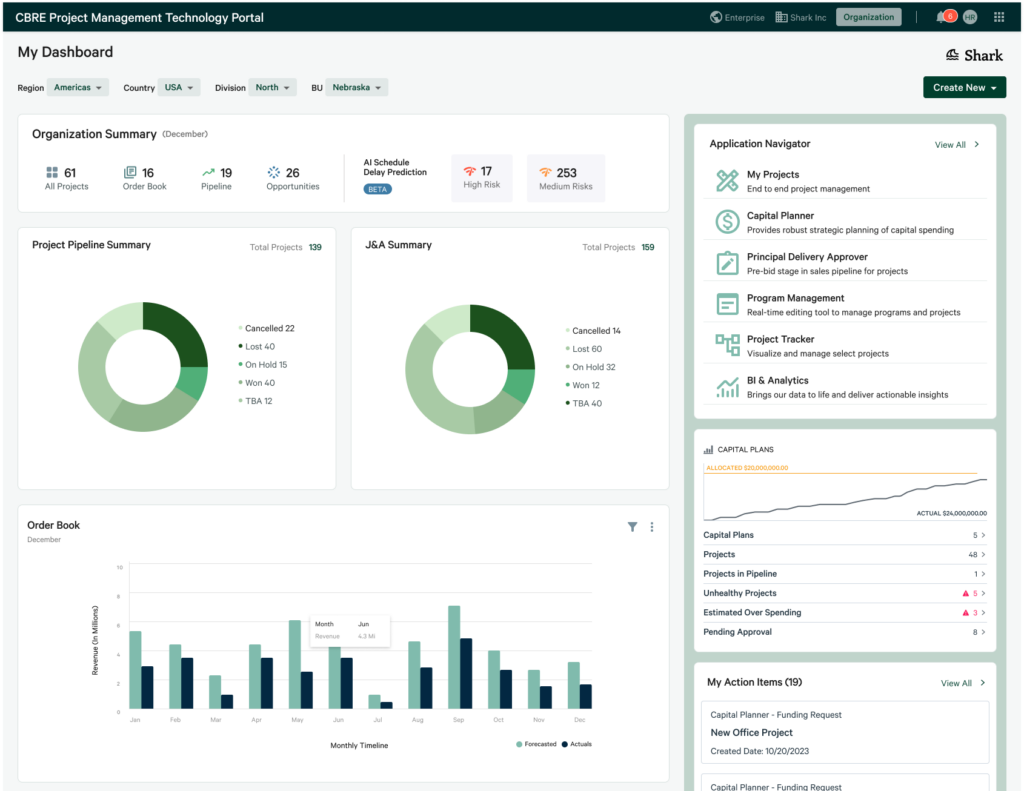
Launched a role-based analytical dashboard replacing a static landing page — giving PMs a "single pane of glass" across their full portfolio at a glance.
Central Document Repository
Developed a tagged, searchable document repository per project — eliminating scattered SharePoint folders and local machine storage entirely.
Emerald Design System Alignment
Systematically redesigned PJM to align with CBRE's Emerald Design System — achieving horizontal consistency, reducing cognitive load & building brand trust.
Continuous Feedback Integration
Implemented a living Opportunity Matrix from UEM + interviews + usability tests — driving 35 prioritised improvements through iterative, data-driven design cycles.
Audit Log & Transparency
Designed Audit Log for project-level accountability — giving users field-level change history, user tracking, and downloadable audit reports for stakeholders.
Five objectives driving
the entire programme
Remove Inefficiency & Fragmentation
Eliminate the need for PMs to access information from multiple disparate systems — creating one unified entry point for all project data.
Reduce Point Solutions & Manual Work
Cut down on non-standard user journeys, redundant point solutions, and time-consuming manual processes to drive greater productivity.
Improve Client Visibility & Outcomes
Provide clients with greater portfolio visibility through integrated dashboards covering project status, capital planning, and financials.
Drive Bottom-Line Benefits
Deliver on a $19.4M productivity opportunity through increased adoption, reduced manual effort, and streamlined operations.
Enhance UEM Score & CSAT
Target a 15% increase in end-user CSAT and a 10% lift in product adoption — both measured against the Q4 2023 baseline of 53.1 UEM.
The pain points
that sparked it all
Fragmented Technology Stack
Kahua adoption was <25%, overall CBRE stack <44%. Tools operated as independent point solutions with no standard user journey across them.
Data Duplication Everywhere
PMs entered the same project data multiple times into different systems (Capital Planner, PDA, Kahua). Files lived on local machines and SharePoint — never synced.
Manual Reporting Overload
An enormous amount of time was spent emailing, manually updating reports, and composing status updates. Emails became reminders rather than actual sources of truth.
No Dashboards or Portfolio View
Tools couldn't generate effective dashboards for clients or internal use. PMs had to pull data from multiple systems to answer a single portfolio-wide question.
Poor Usability (Kahua)
Kahua — the primary tool — was frequently described as slow, clunky, not intuitive, requiring too many clicks, and misaligned with real-world workflows and local needs.
Lack of Training & Awareness
No formal training or knowledge resources existed. Most PMs self-taught and used only tools they discovered independently. Many weren't even aware of available tools.
"Align systems so there is one source of the truth to reduce duplication. Reduce the number of places you have to go to locate one piece of information."— Verbatim UEM Survey Response
Numbers that prove
the design impact
How we got from
"chaos" to clarity
Empathize — Understand the User
Conducted 13 in-depth interviews with Project Managers across diverse regions & Lines of Business (Enterprise, Advisory, Local). Also deployed a UEM survey via Alchemer reaching 383 respondents to quantify ease of use, usefulness, and satisfaction.
Define — Clearly Articulate the Problem
Synthesized qualitative interviews, UEM quantitative scores, and usability feedback into an Opportunity Matrix — a centralized dynamic document capturing 35 actionable items ranked by UX and PM severity ratings.
Ideate — Generate Solutions Without Judgment
Used the Opportunity Matrix and UX Audit in collaborative sessions with product & engineering to identify high-value / low-effort improvements. Mapped solutions against a value-effort matrix to reduce UX debt strategically.
Prototype — Build Testable Representations
Created clickable prototypes in Figma for myProjects, the Digital Command Center, Audit Log, and the full PJM UI refresh. Documented Emerald Design System specifications and created before/after comparison screens for engineering handoff.
Test — Refine Through Feedback
Ran iterative concept + usability testing sessions (5 users for myProjects, 4 enterprise account champions for Audit Log). Gathered structured findings on task completion rates, navigation patterns, and feature comprehension — then rapidly iterated designs.
Implement — Launch & Monitor Performance
Conducted design handoff sessions with engineering, ran mid-sprint check-ins and bug review cycles, and monitored UEM score improvements post-launch. Feedback continued to feed the next iteration cycle through quarterly UEM surveys.
Before & After —
The UX Refresh
- Static landing page with no dashboard
- Legacy application navigator & switcher
- Old tab structure for navigation between modules
- Ambiguous information hierarchy on list pages
- No data summary or inline editing on tables
- Project Shell with confusing UI element mapping
- Success notifications at page bottom (violating Emerald)
- No role-based views or contextual dashboards
- Missing filters, column management, & page actions
- Role-based aggregated analytical dashboard as entry point
- Global application header aligned to Emerald standards
- Standard Emerald navigation bar replacing tabs
- GWS page header pattern with clear information structure
- Emerald table with inline editing & data summary
- New Project Shell with clear back navigation & actions
- Notifications repositioned to top, Emerald-compliant
- Create object action available directly on dashboard
- Filters, manage columns, & profile popover all standardised
The "How Might We"
questions we answered
Unify diverse tools & systems
Deliver a cohesive, end-to-end experience for Project Managers — removing the need to jump between Kahua, PDA, Capital Planner, and Excel just to get a project status.
Improve navigation & usability
Make the PJM platform intuitive and efficient — reducing clicks, eliminating confusing information hierarchy, and aligning UI patterns with the Emerald Design System.
Offer compelling dashboards & reporting
Give PMs and clients comprehensive, visually engaging dashboards — including Single Pane of Glass, profitability widgets, pipeline views, and downloadable financial summaries.
Increase adoption by fixing fragmentation
Move the UEM score from 53.1 to 70+ by resolving fragmented workflows, automating manual tasks, and ensuring the platform felt like it was built for PMs — not handed to them.
Consolidate & standardize project information
Guarantee easy access to all pertinent data for stakeholders — one source of truth, one place to enter data, one platform where information flows seamlessly across applications without manual re-entry.
The principles behind
every design decision
🎨 Design System Compliance
- All components must align with Emerald Design System standards (Level 3 — full adoption for React/Angular apps)
- Notifications positioned at top-middle, 40px from top, using Emerald notification styles
- Table patterns, page headers, & action buttons follow Emerald component specifications
- UI element placement, icons, and color usage are reviewed against Figma references before implementation
📐 Information Architecture
- Simplify information structure to reduce cognitive load at every page level
- GWS Page Header pattern for consistent hierarchical navigation
- Page-level actions positioned close to forms for discoverability
- Data summaries surfaced at list page level for fast record filtering without full drill-down
🧭 Navigation Standards
- Standard Emerald navigation bar replaces legacy tab structures
- Global App Switcher and App Navigator present on all views
- Clear back navigation on all project-level screens
- Role-based navigation: show only what's relevant to the user's role
📊 Data & Dashboard Principles
- Role-based aggregated dashboards replace static landing pages
- Create-object actions always available directly from the dashboard view
- Inline editing in tables reduces navigation overhead for record updates
- Column management and filter controls in every list view per Emerald standards
🔬 Research-Driven Design
- Remove design subjectivity through formal research methodologies — no HiPPO decisions
- Opportunity Matrix cross-references UEM scores, interview insights, and usability feedback before prioritisation
- UX Audit and Opportunity Matrix are kept as separate living documents to avoid conflation of design debt vs. feature opportunity
- Usability tests conducted iteratively — not just at prototype stage, but post-launch
🤝 Engineering Collaboration
- Design specs written in Figma with links shared in every ADO backlog ticket
- Mid-sprint check-ins with engineering to catch design drift before it ships
- Bug review sessions use the Usability / Emerald Compliance / Engineering three-axis severity classification
- Design handoff sessions scheduled before each sprint cycle, not after
Users stopped complaining.
They started requesting.
The shift in sentiment was palpable. Where once 78% of UEM free-text responses were negative, users were now rating PJM above 70 and asking for enhancements — not just reporting bugs. Novice users rated PJM above 70 for the first time, suggesting the onboarding & training improvements were working.
"myProjects is the best platform I have ever used within my almost 30 years of experience."
"By unifying disparate tools and optimizing the user journey, PJM successfully transformed a fragmented workflow into a seamless, one-stop shop."
"Having a central data repository for each project is a game-changer! I'm thrilled with how PJM has eliminated data duplication."
"Our reporting system has become highly efficient. I no longer spend as much time manually preparing and updating reports."